Menus
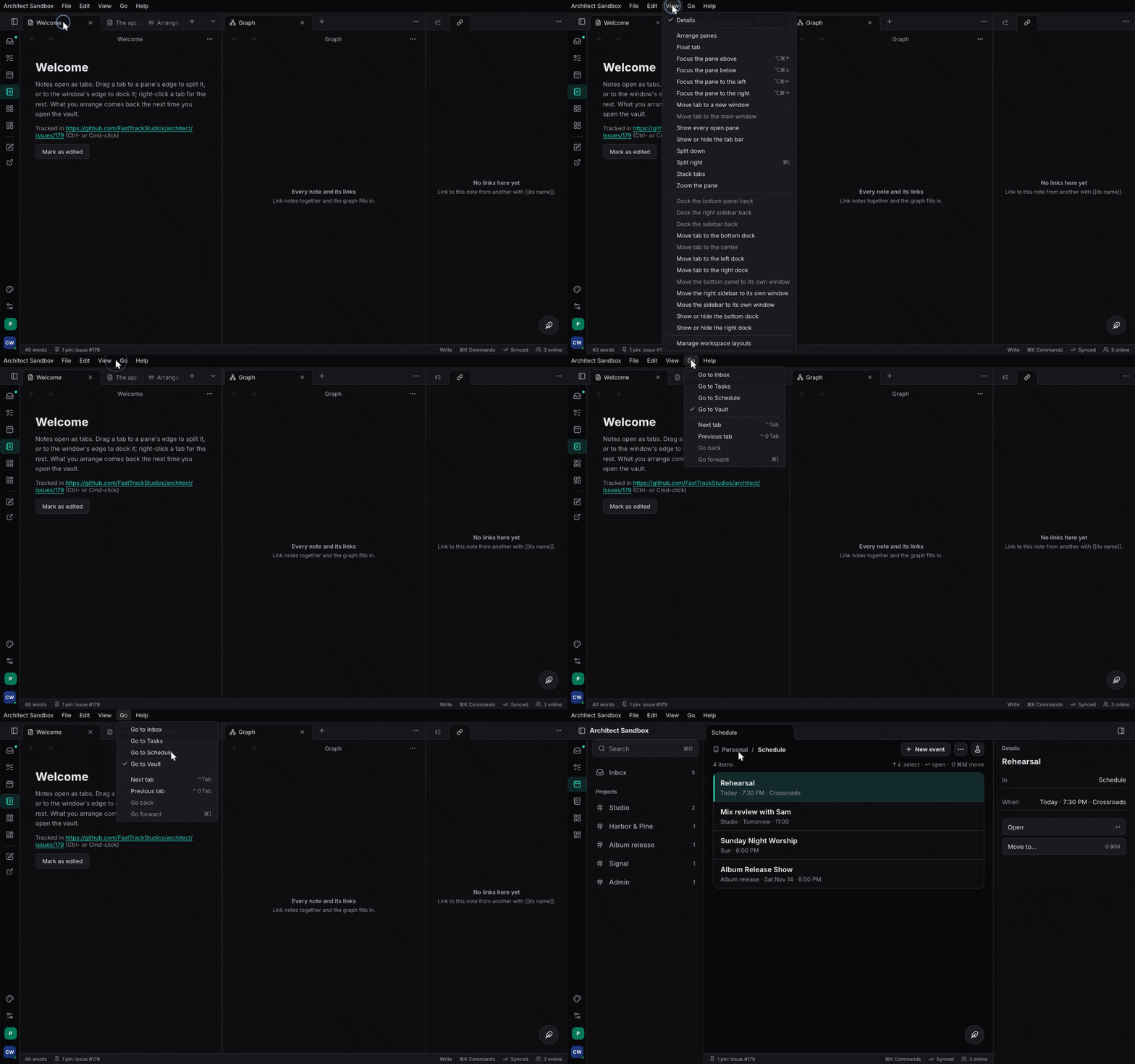
The menu bar declared over command ids: labels, shortcuts, enabled state and ticks from the commands, live sections, native on macOS, Linux and iPadOS, in the window elsewhere.
What it is and when to use it#
MenuBar declares the app’s menus (the app menu, File, Edit, View, …,
Window, Help) as lists of command ids. The labels, shortcuts, enabled or
disabled state with its reason, and ticks all come from the commands, so a
menu item never has a handler of its own: picking it runs the action. A live
section is a function read each time the bar is resolved (open windows, the
screensets). The same bar is drawn natively on macOS, through dbusmenu on
Linux, with UIMenuBuilder on iPadOS, and in the window where there is no
global menu.
Use it for every app’s menu bar. Design: App menus.
A minimal example#
The model is in the default build of architect-commands; ui adds
InWindowMenus, native adds NativeMenus. From apps/ui/src/lib.rs:
let menus = architect_commands::MenuBar::standard("Architect Lab")
    .menu("File", |m| m
        .commands(["LAB_CAPTURE", "COMMAND_PALETTE_OPEN_ANYTHING"])
        .separator()
        .command("WORKSPACE_CLOSE_TAB"))
    .menu("View", |m| m
        .command("LAB_TOGGLE_DETAILS")
        .separator()
        .section("Screensets", move || sets.read().menu_rows("VIEW_RECALL_SCREENSET")))
    .menu("Help", |m| m.command("COMMAND_PALETTE_OPEN"));

rsx! {
    architect_commands::NativeMenus { bar: menus.clone() }   // macOS, Linux, iPadOS
    architect_commands::InWindowMenus { bar: menus }         // stands aside under a global menu
}
A toggle gets its tick from the list:
list.set_checked("VIEW_MIXER", || mixer_open())?. When what an enabled or
checked test reads changes outside an action run, call list.changed(..), or
the bar keeps the old state.
Code tour#
features/commands/src/menu.rsMenuBar:standard,menu(a new menu goes before Window and Help),resolveagainst the commands there are.- Same file,
Menu:command,commands,group,separator,submenu,section;Liverows (args,checked,disabled);without_platform. - Same file,
Tree: the resolved bar numbered for a backend;picksays what a picked item runs. crates/architect/src/action_list.rsActionList::set_checked: a toggle’s tick, carried to the command byfeatures/commands/src/ui.rs.features/commands/src/native_menu.rsNativeMenus(macOS),features/commands/src/linux_menu.rswithfeatures/commands/src/dbusmenu.rs, andfeatures/commands/src/ios_menu.rs: the same component per platform.features/commands/src/menu_view.rsInWindowMenus;Commands::has_global_menuandCommands::run_pickinfeatures/commands/src/ui.rs.features/workspace/src/screenset.rsScreensets::menu_rows: the screensets as live rows, the current one ticked.
NativeMenus resolves the bar against Commands::all(): live sections run,
missing ids and stray separators drop out, and the result becomes a Tree
the platform backend draws. A pick comes back as a tree id; Tree::pick
turns it into a command and its arguments, and Commands::run_pick runs it
on the UI thread. The bar resolves again when the commands’ event counter
moves (a run, list.changed, a registration) or a signal a section reads
changes, never on a timer.
Tests to read#
features/commands/tests/commands.rs: a bar resolves against the commands there are; a new menu goes before Window and Help; a toggle resolves with its tick; a live section is read when the bar is resolved; platform items go without the platform; a tree numbers the bar and says what a pick runs.features/workspace/tests/workspace.rs: the View menu lists the screensets with the current one ticked.
Status#
Done in architect. The Linux and iPadOS bars build but have not been run on a device. Open: the macOS About, Services and Hide items; a shortcut the menu shows but the keymap does not bind.
- Task has no menu bar.
- Studio has its own (
studio:apps/signal/desktop/src/mac_menu.rs, and Session’s dbusmenu instudio:apps/session/daw/src/app_menu/bus.rs); both are to move ontoMenuBar.