Scripts, extensions and canvases
Let people and models add to the app without rebuilding it: Luau scripts over the Action List as one undo step, extensions with manifests, registries and hot reload, process extensions with remote views, and ImGui-shaped canvases over a view.
Everything earlier in this guide is built into the app. This chapter opens it up, so a person, an organization or a model can add to it while it runs. The one API all of it speaks is the Action List: a script, an extension and a model reach the app only through its actions. You will:
- run Luau scripts over the Action List, each run one undo step, and save them as actions of their own (also over MCP);
- load extensions from manifests: built in, installed from a registry, or a development copy that reloads when its files are saved;
- run a process extension whose view is drawn in another process and shown in a pane;
- let a script draw over a view and open tool windows with an ImGui-shaped API.
The sandbox runs all four: its metronome (apps/sandbox/extensions/metronome), its
clicker (apps/sandbox/clicker), and a marker lane over its arrangement
(apps/ui/src/marker_lane.luau).
1. Scripts: architect-scripting#
A script is a Luau program over the Action List. It lists and describes actions, queries the read-only ones, runs the others, and loops and branches in between:
-- Arm every selected track
local selected = state.query("TRACKS_SELECTED")
for _, id in selected do
  actions.run("TRACKS_ARM", { id = id, on = true })
  print("armed", id)
end
return #selected
A script’s globals are actions.list, actions.describe, actions.run,
actions.enabled, state.query (read-only actions only), print / log,
and args; it returns its result.
Install it on the list#
features/scripting (feature luau for the runtime; crdt for undo over
a document’s History; settings to keep saved scripts in a settings
file). From features/scripting/tests/scripts.rs:
use architect_scripting::actions::Scripting;
use architect_scripting::history::HistoryTransactions;
use architect_scripting::{Library, MemoryStore};

let scripting = Scripting::new(
    list.clone(),
    Library::new(person_store).with_org(org_store),     // where saved scripts live
)
.with_transactions(HistoryTransactions::new(doc.clone(), Arc::clone(&history)));
scripting.install()?;
install puts the SCRIPT_* actions on the list (SCRIPT_RUN runs one
once, SCRIPT_SAVE saves one, SCRIPT_DESCRIBE describes the API to a
model, plus SCRIPT_LIST, SCRIPT_DELETE and their _ORG forms) and
every saved script as an action of its own: “Arm every selected track”
becomes SCRIPT_MY_ARM_EVERY_SELECTED_TRACK, in ⌘K under “Your scripts”,
bindable to a key, runnable by a model. An organization’s scripts are
SCRIPT_ORG_…, and saving one is a separate action id so a permission
engine can keep it to some people.
One undo step#
A run opens one step (Transactions::begin), commits it at the end and
aborts it on failure. With HistoryTransactions, every History::transact
the script’s actions make while the step is open folds into it, so the run
undoes as one. That only works if the actions and the scripting share the
app’s one Arc<Mutex<History>> (the documents chapter).
a_saved_script_runs_from_the_palette_and_undoes_as_one_step is the proof.
Over MCP#
Nothing extra: SCRIPT_RUN, SCRIPT_SAVE and SCRIPT_DESCRIBE are
actions, so a model sees them over MCP like any other. Each action a script
runs goes through the run’s caller, so a model’s script can do exactly what
the model may.
Limits (Limits { memory, steps } per run, MAX_RUNNING runs at once) and
a failure’s line (ScriptError { kind, line, message }) are in
features/scripting/src/luau.rs. A live script hands defer(fn) a frame
function (ReaScript’s reaper.defer), which the host calls one frame at a
time (Runtime::start, Live::frame).
Example: examples/scripting, a task board scripted from Luau, saved scripts as actions and the board over MCP; walked through in Script an app, end to end.
2. Extensions: architect-extensions#
An extension is a package: an extension.toml manifest and its files. It
adds what the app’s own features add (actions, settings sections, views,
openers, keys, overlays, document data) without a rebuild. The sandbox’s
metronome:
id = "fts.metronome"
name = "Metronome"
version = "0.1.0"
kind = "luau"
api = "0.1"

[[actions]]
id = "FTS_METRONOME_COUNT_IN"
name = "Metronome: count in"
params = '{"type":"object","properties":{"bars":{"type":"integer","minimum":1}}}'
script = "count_in.luau"

[[sections]]
id = "metronome"
title = "Metronome"
icon = "timer"

[[sections.settings]]
key = "fts.metronome.accent"
title = "Accent the downbeat"
control = "switch"
default = true
(apps/sandbox/extensions/metronome/extension.toml, shortened.)
- Kinds.
data(settings, presets, keys; runs nothing) andluau(scripts on the scripting runtime) run built in.process(a program speaking vox, desk only) runs withProcessRunner, below.wasmneeds a runner the app adds; none ships yet. - Names are owned. An extension’s action ids start with its id’s prefix
(
fts.metronome→FTS_METRONOME_), its setting keys with<id>.; its sections and actions leave with it. - Capabilities. A Luau extension runs inside its
[capabilities](actionsprefixes it may run, the mosteffectit may have); a model calling its action still runs as the model.
Load them#
The sandbox’s root component, apps/ui/src/extensions.rs LabExtensions,
trimmed:
let sections = use_extension_sections();                  // their settings on the settings page
let list = use_hook(|| Arc::new(ActionList::new()));
architect_commands::use_action_list(Arc::clone(&list));   // their actions in ⌘K
let extensions = use_hook(|| {
    let host = Host::new((*list).clone(), sections.clone());
    let mut ext = Extensions::new(host, Installs::new(root.join("extensions")))
        .with_source(FolderRegistry::new(registry_dir));   // or GitRegistry, ReaPackSource
    if let Some(p) = builtin() {
        ext = ext.with_builtin(p);                        // Package::embedded(manifest, files)
    }
    let _ = ext.install_actions();                        // EXT_LIST / SEARCH / INSTALL / UNINSTALL / RELOAD
    ext
});
- Which copy runs (
features/extensions/src/catalog.rschoose): a development copy (ext.dev(dir)), else an installed one newer than the built-in, else the built-in.disable(id)keeps it off whatever copies exist;enable(id)turns it back on.sync()loads the copy of each that should run, reloads one whose copy changed and unloads one that has none. - Registries.
FolderRegistry(a folder with anindex.toml; its installs are links, so an edit there reloads),GitRegistry(shells out togit),ReaPackSource(a ReaPackindex.xml).install(id, &VersionReq::STAR)installs from the sources;EXT_SEARCHandEXT_INSTALLdo the same from ⌘K or MCP. - Hot reload. Call
reload_changed()on a timer (the sandbox polls every 500 ms). A reload is a diff: kept actions keep their ids, settings keep their values, and on any failure nothing is swapped and the last good copy keeps running. - A project’s needs. A document can carry the extensions it needs
(
Requirementsin itsmeta, featurecrdt);Extensions::openmakes aPlan(install, offer, missing) under the org’sPolicy, andacceptinstalls and loads it.
features/extensions/tests/metronome.rs installs, runs, edits and reloads
the metronome.
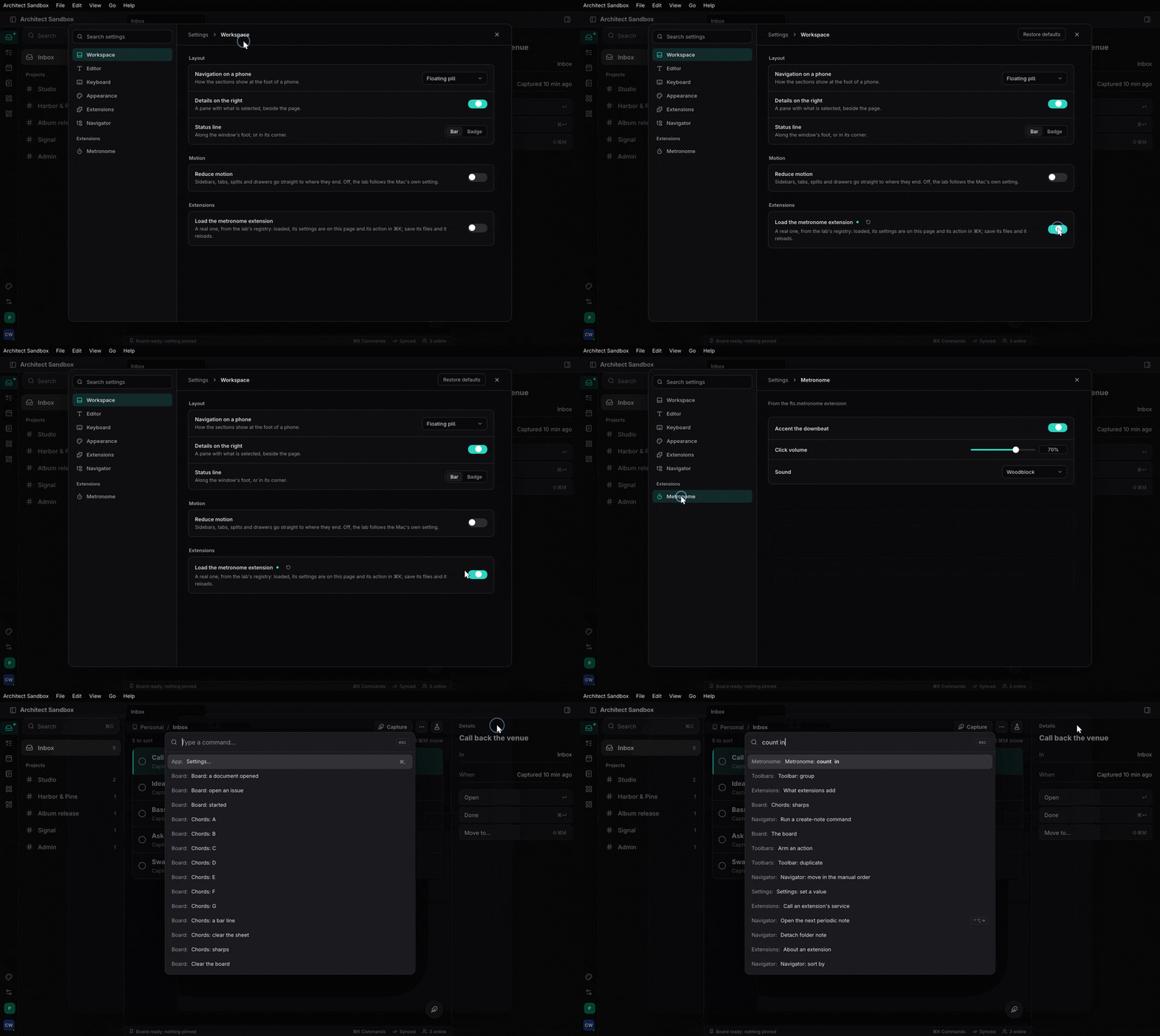
Example: examples/extension, a registry with a Luau extension and a process extension loaded by a small host, hot-reloaded on save; walked through in Write an extension, end to end.
Process extensions and remote views#
A process extension is a program of its own. It declares its views and
actions in its manifest (apps/sandbox/clicker/extension.toml: kind = "process",
[entry] path, [[views]] id = "counter"), and its main serves them
(features/extensions/src/guest.rs Guest, feature guest):
fn main() -> Result<(), GuestError> {
    Guest::new()
        .view("counter", Counter)                       // a Dioxus component, run in this process
        .action("LAB_CLICKER_CLICKS", |_| async {
            Ok(serde_json::json!(CLICKS.load(Ordering::Relaxed)))
        })
        .serve()
}
The app adds the runner to its host
(Host::new(…).with_runner(ProcessRunner::new()?.with_processes(processes())),
feature process) and shows a view in a pane with RemoteView (feature
remote), as the sandbox’s Vault does:
View::new("clicker", "Clicker", |_| rsx! {
    architect_extensions::remote::RemoteView {
        processes: crate::extensions::processes(),
        extension: crate::extensions::CLICKER,
        view: "counter",
    }
})
The host starts the program, checks its hello covers what the manifest
declares, and supervises it: when it dies the app runs on, the pane says
why with a button to start it again, and it is restarted with backoff. The
view’s VirtualDom runs in the extension’s process; its edits arrive over
vox as frames that RemoteView applies to a Blitz sub-document, and the
pane’s keys and clicks go back. The applier trusts nothing: an edit naming
a node it does not have fails the view, not the app.
features/extensions/tests/remote_view.rs drives it end to end.
Not yet: pointer, wheel and scroll events and IME into a remote view, stdio as a transport, state handed over on a reload, Windows.
3. Canvases: architect-canvas#
A script or an extension can draw over another view (markers over an arrangement, a guide over a chart) and open its own tool windows, in the shape REAPER’s ReaImGui made familiar. The sandbox’s marker lane draws flags over its arrangement and opens a window of sliders that tune them:
local ImGui = require 'imgui' '0.10'
local ctx = ImGui.CreateContext('Markers')
local lane = Canvas.Layer('lab.arrange', 'over', 'markers')

local function loop()
  local spaces = Canvas.Spaces(lane)
  if spaces then
    local x = Canvas.TimeToX(lane, 24)
    Canvas.Line(lane, x, 0, x, spaces.height, 0xF59E0B88, 1)
    local hovered, clicked = Canvas.Region(lane, 'marker:Chorus', x, 0, 60, 18)
  end
  local visible, open = ImGui.Begin(ctx, 'Marker lane', true)
  if visible then
    _, height = ImGui.SliderInt(ctx, 'Height', height, 12, 56, '%d pt')
    ImGui.End(ctx)
  end
  if open then defer(loop) end
end
defer(loop)
(apps/ui/src/marker_lane.luau, shortened.)
- Spaces. The view publishes its coordinate spaces (
Spaces: time across, lanes down, already scrolled and zoomed). A layer draws in those, soTimeToXlands on the same second however the view is zoomed. - The pointer passes through except over the regions a layer claims
(
Canvas.Region→hovered, clicked, held, context). - A window is a workspace pane: docked, tabbed, floated or stacked like
any other, laid out at its pane’s size; closing its pane gives
open == falseonce. - Frames come on change, not on a timer: a press, a release, a resize.
On Blitz the app wires it in four places (apps/ui/src/arrange.rs,
apps/ui/src/vault.rs):
let _canvases = architect_canvas::ui::use_canvases();          // once, at the page
architect_canvas::ui::use_tool_windows(workspace);              // windows become panes
// in the Views:
views.view(architect_canvas::ui::window_view());
// per script:
use_script_canvas(Runtime::new(list), ActionCaller::app(), source, args, "Marker lane".into(), style);
and the view being drawn over publishes its spaces
(canvases.publish("lab.arrange", Some(&spaces))) and mounts
CanvasLayers { view, plane } as a child of its positioned root.
features/canvas/tests/marker_lane.rs runs the same script without a UI.
An extension declares an overlay in its manifest ([[overlays]] id, view, plane, script, Luau only). Today the app starts it as a Session itself;
the host starting overlays is still to come.
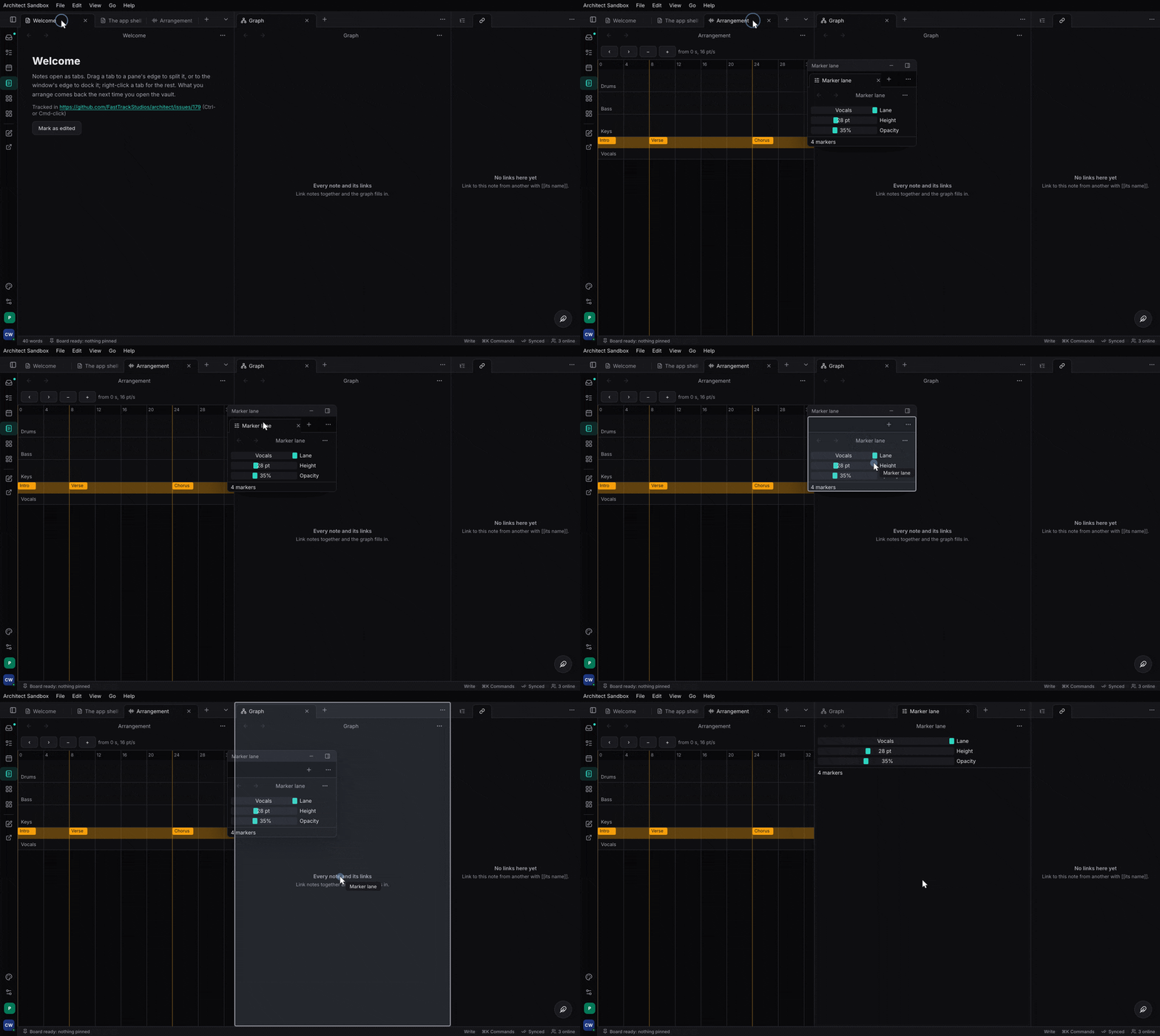
Shapes are drawn as boxes: Blitz has no texture widget yet, so there is no
egui or <canvas> behind the API.
Where Task and Studio are#
Scripting, the extensions runtime, process extensions and canvases are
architect-side and running in the sandbox. Studio’s arrangement publishing its
spaces (so scripts can draw over the real one), Studio’s JSFX, a wasm
runner and the WIT interface, and Task and Studio installing extensions
are still to come.
Where to read more#
- Extensions and scripts: the layers, the API as the Action List, scripts for agents, remote views, processes, hot reload, ImGui, overlays, capabilities, registries.
- Extensibility: swapping a feature’s implementation at build time (in-tree or a third-party crate), the other axis of extending an app.
skills/architect/references/commands-mcp.md(the scripting, canvas and extensions sections).
Linked from
- Build an app with architectA chapter-by-chapter walk through building a real app on architect: the contract, the backend, the server, the clients, the tests and the release.
- SettingsDeclare settings once as a typed struct; architect stores each in its scope (this device, the person's, the project's) under an org's defaults and locks, and draws the settings page with search to the row.
- Documents, sync and filesAn app's work as CRDT documents: kinds and named undo, the document file, sync to the org through the org driver, peer to peer by link and on the LAN, presence and collaborative text, blobs by hash, and Files.