Settings
Declare settings once as a typed struct; architect stores each in its scope (this device, the person's, the project's) under an org's defaults and locks, and draws the settings page with search to the row.
An app declares its settings once, as structs. The store, the settings page, its search, the reset arrows and “Restore defaults” all come from the declaration. In this chapter you will:
- declare a section with
#[derive(Settings)]; - read and change it with
use_settings::<T>(), and outside the UI withT::read; - choose each section’s scope and keep each scope’s values where they belong: the device, the person’s synced document, the project;
- apply an organization’s defaults and locks;
- mount the settings page, opened by ⌘, and found from ⌘K’s
#.
Everything here is architect-settings (features/settings). The default
build is the model (wasm-clean); feature store keeps device and project
values on disk, synced keeps the person’s in a CRDT document, ui draws
the page and gives the hooks. The sandbox registers four sections
(apps/ui/src/settings.rs); the derive’s full behaviour is pinned by
features/settings/tests/derive.rs.
Device-only key/value storage without a page is architect’s own
architect::settings::Store<T>
(app settings); this chapter is the layer
above it.
1. Declare a section#
A facet struct with Default becomes a section. The doc comments are the
words, the types are the controls, Default is the defaults:
use architect_settings::Settings;
use facet::Facet;

/// Editor
#[derive(Facet, Settings, Clone, PartialEq)]
#[settings(icon = "type")]
pub struct Editor {
    /// Vim keys
    /// Move and edit with Vim's keys.
    #[setting(aliases = ["modal", "hjkl"])]
    pub vim: bool,
    /// Line width
    /// How wide a line of a note runs.
    #[setting(control = slider(40..=120, step = 1), unit = " ch")]
    pub width: f64,
    /// A new note's title
    #[setting(placeholder = "Untitled")]
    pub new_title: String,
}
That is the sandbox’s Editor (with a hand-written Default). The rules:
- Words. A field’s doc comment: the first line is its title, the rest
its description. A field with no doc comment is its name in words
(
reduce_motion→ “Reduce motion”). The struct’s first doc line is the section’s title. - Keys.
<section id>.<field>, the section id being the struct’s name in snake case unless#[settings(id = "…")]says otherwise (editor.vim,editor.width). A nested struct field is a titled block of its own, keyed one level deeper (audio.input.monitor). - Controls from types.
boolis a switch; an enum of unit variants a select (each variant’s doc comment its label and detail); integers a stepper; floats a slider;Stringa text field. Override withcontrol = switch | select | segmented | cards | stepper | slider | text | shortcut, or with a range:slider(80..=140, step = 5),stepper(1..=16). - Other field attributes.
range = 1..=64,step,unit = "%",choices = [64, 128, 256],aliases = ["dark mode"](search finds the row by them),placeholder,skip(never on the page). - What it cannot show (a
Vec, a map) is left off the page and keeps its default.Option<T>andKeyChordfields are not taken yet.
A section can also be written as data, which is what an extension does at
run time: Section::new("workspace", "Workspace").block(Some("Layout"), vec![Setting::new(key, title, Control::Switch, Value::Bool(true)).describe(…)])
(the sandbox’s appearance, workspace and keyboard sections).
2. Read and change it#
In a component:
let editor = architect_settings::use_settings::<Editor>();
let width = editor.read().width;              // redraws when it changes
editor.update(|e| e.vim = true);              // stores each field that changed, in its scope
use_settings registers the section if it is not registered yet. A single
key, untyped: use_setting("workspace.details") returns the Value.
Outside the UI (an audio engine reading its buffer size before any page exists), the same type reads from a registry and the values:
let audio = Audio::read(®istry, &values);
ScopedValues::set checks every value against its setting (a choice not in
choices is ValueError::Refused), and a slider’s value snaps to its step.
3. Scopes, and where each is kept#
#[settings(scope = …)] says where a section’s values live:
| Scope | Lives | Kept by |
|---|---|---|
Device (the default) | on this device | DeviceValues::open(app) → <app dir>/settings.json (feature store) |
Synced | with the person, on every device | DocValues over a Loro document every device syncs (feature synced) |
Project | in the open project | ProjectValues::in_dir(app, dir) → <dir>/settings.json, or DocValues over the project’s document |
ScopedValues holds all three plus the org’s settings. You put it in
context with use_settings_provider, and every change comes back to you as
a SettingsChange (the scope, its values, the keys that changed) for that
scope’s store. The sandbox keeps only device values:
let store = use_hook(|| architect_settings::DeviceValues::open("architect-lab").ok().map(Rc::new));
let save = store.clone();
let settings = architect_settings::use_settings_provider(
    settings::registry,
    || architect_settings::ScopedValues {
        device: store.as_ref().map(|s| s.load()).unwrap_or_default(),
        ..Default::default()
    },
    Some(Callback::new(move |change: architect_settings::SettingsChange| {
        if change.scope == architect_settings::Scope::Device {
            if let Some(s) = save.as_ref() {
                let _ = s.save(&change.values);
            }
        }
    })),
);
Synced settings#
The Synced store is a CRDT document: DocValues keeps the values in its
root map, one entry per key, so two devices that changed different settings
offline both keep theirs, and a key changed on both takes the later write.
- Open the person’s document under the same id on every device:
synced_doc_id(app, person), withcrdt::docs’Lineage::Merge(every device makes it offline under one derived id; see the documents chapter). - On a
SettingsChangeforScope::Synced, write only what changed:doc_values.save_keys(&change.values, &change.keys). - When another device’s edit arrives (
doc_values.on_remote_change(…)), put the values back:settings.replace(Scope::Synced, doc_values.load()).
a_synced_setting_follows_the_person_to_another_device in
features/settings/tests/derive.rs is that loop over two Loro documents.
4. An organization’s defaults and locks#
An org can set its own default for a key and lock keys its members cannot
change (OrgSettings):
values.org = OrgSettings::new()
    .default_to("audio.buffer", Value::Int(512))
    .default_to("audio.tracks", Value::Int(32))
    .lock("audio.tracks");
A value reads, in order: the org’s lock, its own scope’s value, the org’s
default, the declared default. A locked row stays on the page, dimmed,
saying “Set by your organization”; setting it is ValueError::Locked.
Choosing the org’s default is not a change (no dot, nothing to reset).
When the window’s org changes, hand the new one over with
SettingsHandle::set_org. Which org’s settings apply, and the admin’s page
to edit them, are not built yet: today the app supplies OrgSettings.
5. The settings page#
Mount it once, anywhere under the provider and the commands layer:
rsx! {
    AppShell { /* … */ }
    architect_commands::CommandLayer {}
    architect_settings::SettingsPage {}
}
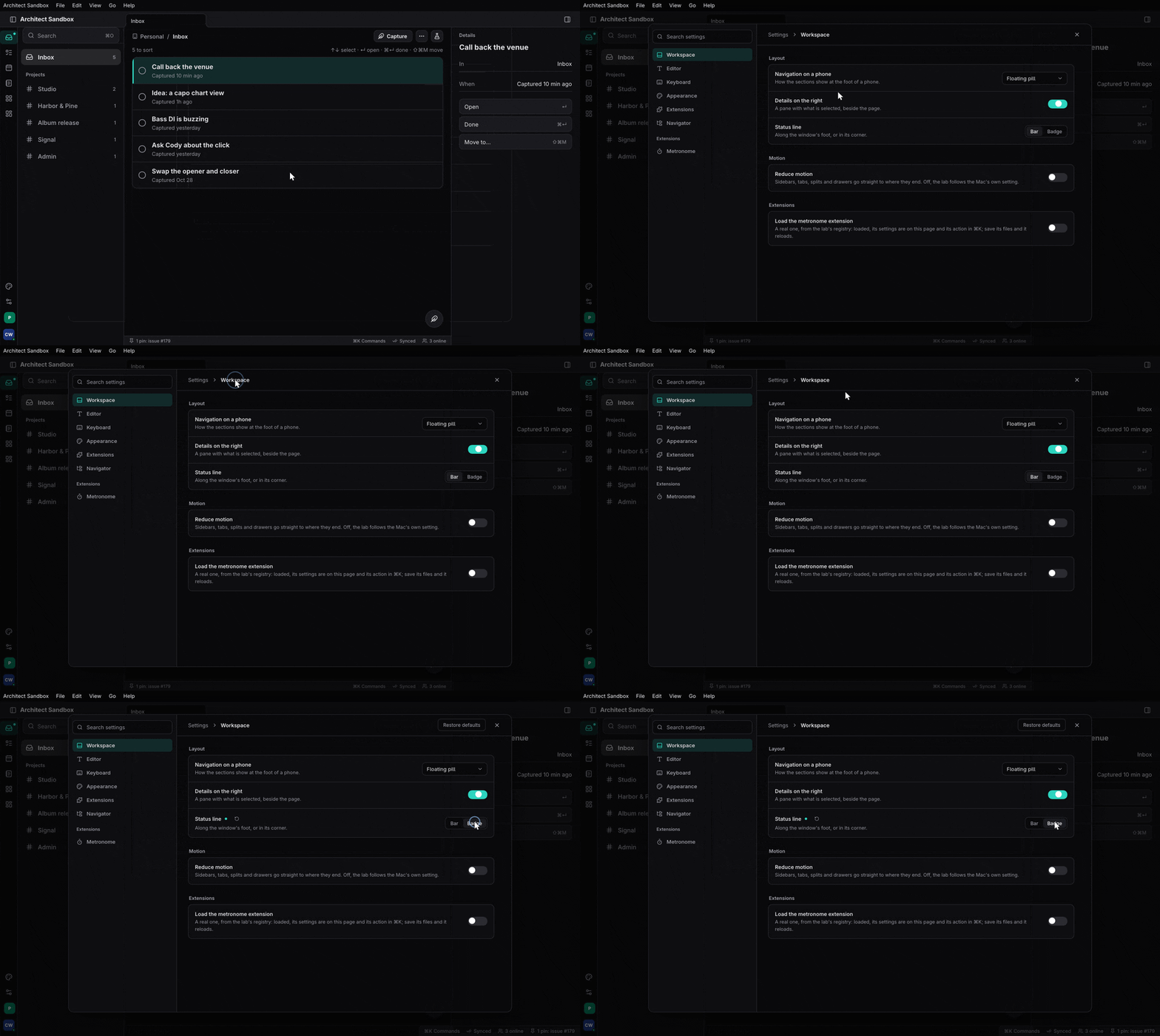
SettingsPage (features/settings/src/ui.rs) is T3 Code’s page: on a desk
a modal with the sections listed by group on the left and the section’s
rows on the right; on a phone the iOS grouped list. Each row has its title,
description and control, a dot when it is not the default, and a reset
arrow; “Restore defaults” lists a section’s changed rows and asks first.
It registers two things itself:
- the
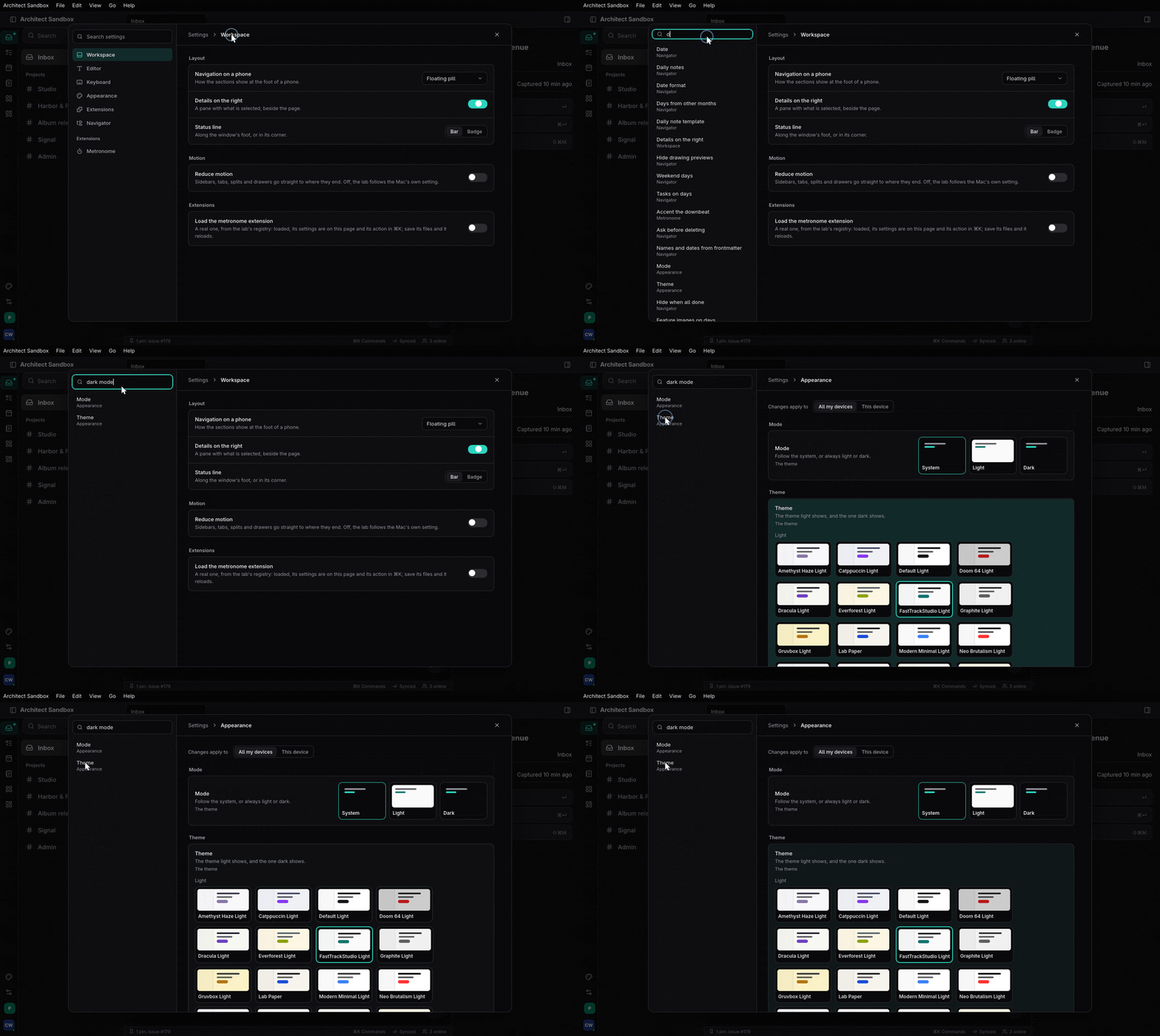
APP_SETTINGScommand (“Settings…”, ⌘,), so it is in the palette and the menu bar; - the palette’s
#finder: “# dark” lists matching settings by title, description and aliases, and picking one opens its section, scrolls to the row and pulses it (SettingsHandle::show_setting).
Open it from code with settings.show(None) or settings.show(Some("editor"))
(the sandbox’s account menu does).
Extensions’ sections#
A section can belong to an extension (Section::owned_by(id), its owner
Owner::Extension(id)): Registry::register it, and
Registry::remove_owner takes every section of that owner away when it
unloads. In a component, use_section(|| section) registers one while the
component is mounted. The extensions host does this for you
(architect_extensions::ui::use_extension_sections, in the
extending chapter); the values of an extension’s
settings survive its reloads, since its keys do not change.
Where Task and Studio are#
The derive, the scopes and the page are architect-side. Task’s six panels
and Studio’s and Session’s SettingsPanels are still hand-written; moving
them onto #[derive(Settings)] sections is their work. Task’s UserPrefs
entity is the pattern DocValues generalises.
Where to read more#
- Settings: declared once, a page for free: the declaration, scopes and the org, the page’s design.
- App settings:
architect::settings::Store<T>, atomic and skip-if-equal device storage. - Organizations: where an org’s settings are keyed.
Linked from
- Build an app with architectA chapter-by-chapter walk through building a real app on architect: the contract, the backend, the server, the clients, the tests and the release.
- The UI primitivesWhat architect ships to draw an app with: architect-ui's components and theme tokens, the shell's page parts, every kind of tab and pane in the workspace, the commands overlays, the settings page, and architect-story to browse them.