Commands, keys and menus
Put everything the app does on the Action List once, and get the ⌘K palette, ⌘O, the action list window and its binding editor, keys through architect-input, native and in-window menus, and MCP from it.
In an architect app, everything the program can do is an action on its Action List, with an id. A menu item, a key, the ⌘K palette, a script and a model over MCP all run the same action by that id; none of them holds a handler of its own. In this chapter you will:
- register actions on an
ActionList, and commands a view owns while it is mounted; - mount the commands layer: ⌘K, ⌘O and the action list window with its binding editor;
- bind keys, sequences, held-letter tools and MIDI/OSC through
architect-input, with the person’s layer over the app’s keymap; - build the menu bar from the same commands: native on macOS, Linux and iPad, in the window elsewhere;
- serve the list to a model over MCP.
The sandbox wires all of it: apps/ui/src/lib.rs LabApp.
1. Actions#
The Action List is architect::action (crates/architect/src/action_list.rs,
architect’s action-list feature). An action is an ActionMeta (its id,
label, description, group, display shortcut), an Effect (read-only,
mutating, destructive), and a handler that takes facet arguments:
use architect::action::{ActionList, ActionMeta, Effect};

let list = ActionList::new();
list.register(&HITS, Effect::ReadOnly, |q: Query| {
    Ok(Hits { times: hits(&q.track, q.limit.unwrap_or(10)) })
})?;
list.register_async(&ASK, Effect::ReadOnly, move |q: Ask| {
    let client = client.clone();
    async move { client.ask(q.name).await.map_err(|e| e.to_string()) }
})?;
- Ids are the contract.
AREA_VERBin SCREAMING_SNAKE (TRACKS_ARM). Keymaps, menus and saved scripts store the id, so never rename one. - Enabled and ticked.
list.set_enabled(id, || Err("nothing selected".into()))disables an action with its reason;list.set_checked(id, || on)makes it a toggle that every menu ticks. - Many at once.
#[architect::actions(namespace = "SESSION")]on a trait of&selfmethods registers each as an action;#[architect::service(actions)]projects every method of a service onto the list (<NS>_<METHOD>). - Check it in a test.
list.validate()reports duplicate ids, bad id shapes, duplicate shortcuts and malformed schemas.
The full API (callers, contexts, async doors, watching) is the Action List page; this chapter is about what the UI does with it.
A view’s own commands#
Some commands exist only while a view is on screen: “Mark done” on a list,
“Open the selected item”. A view registers them with use_command
(features/commands/src/ui.rs); they are in the palette, run by their
shortcut, and gone when the view unmounts. From the sandbox:
architect_commands::use_command(
    architect_commands::Command::new("LAB_CAPTURE", "Capture")
        .group("Inbox")
        .shortcut("⇧⌘N"),
    move || lab.capture("inbox"),
);
architect_commands::use_command(
    architect_commands::Command::new("LAB_TOGGLE_DETAILS", "Details")
        .group("View")
        .checked((lab.right)()),          // a toggle: ticked in every menu
    move || lab.put_bool("workspace.details", !(lab.right)()),
);
architect_commands::use_command(
    if undone.is_some() { undo } else { undo.disabled("nothing has been completed or deleted") },
    move || lab.undo(),
);
Call it on every render: the label, shortcut, enabled and checked state are kept current; the handler is the first one given.
2. The commands layer: ⌘K, ⌘O, the action list window#
At the root, put a Commands in context, hand it the app’s Action List, and
mount the overlay layer:
let commands = architect_commands::use_commands_provider();
architect_commands::use_action_list(list.clone());   // every action is a command
rsx! {
    architect_commands::WindowKeys {}                  // desk: hear the window's chords
    AppShell { /* … */ }
    architect_commands::CommandLayer {}                // the palette and quick open
}
WindowKeys (features/commands/src/native.rs, feature native) matters
in Blitz: keys reach the DOM only through what has focus, so a chord must be
heard at the window to work after a click on empty space.
What you get:
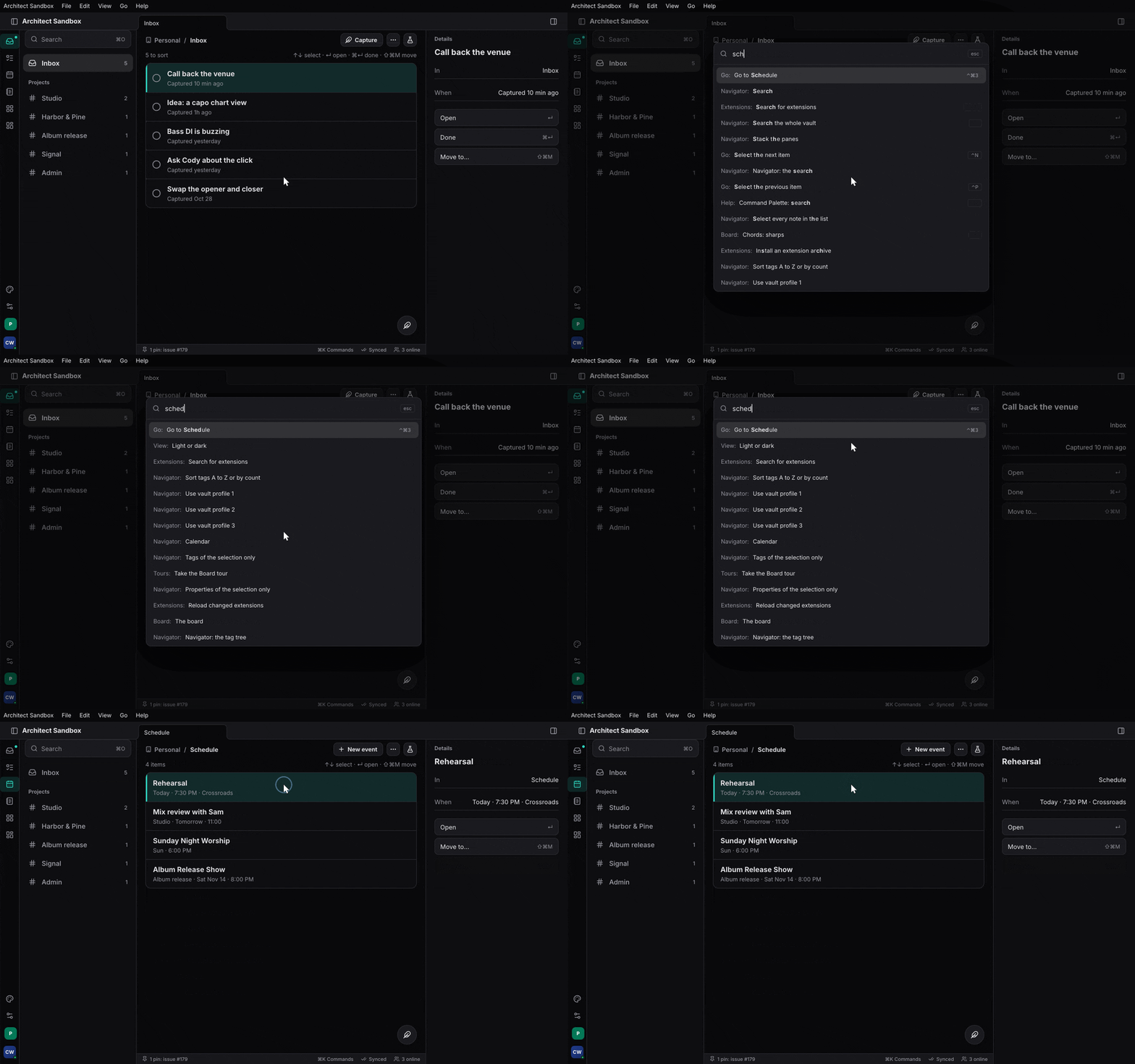
- ⌘K, the palette (the Command Palette extension’s
PaletteView, #381): every enabled command, the most specific first, recent first when the field is empty, disabled ones dimmed with why. An action with arguments asks for them a step at a time from its params schema (features/commands/src/params.rs). Prefixes narrow it:@this page’s targets,#settings,?help for a key. Open it withcommands.show(Overlay::Palette).
-
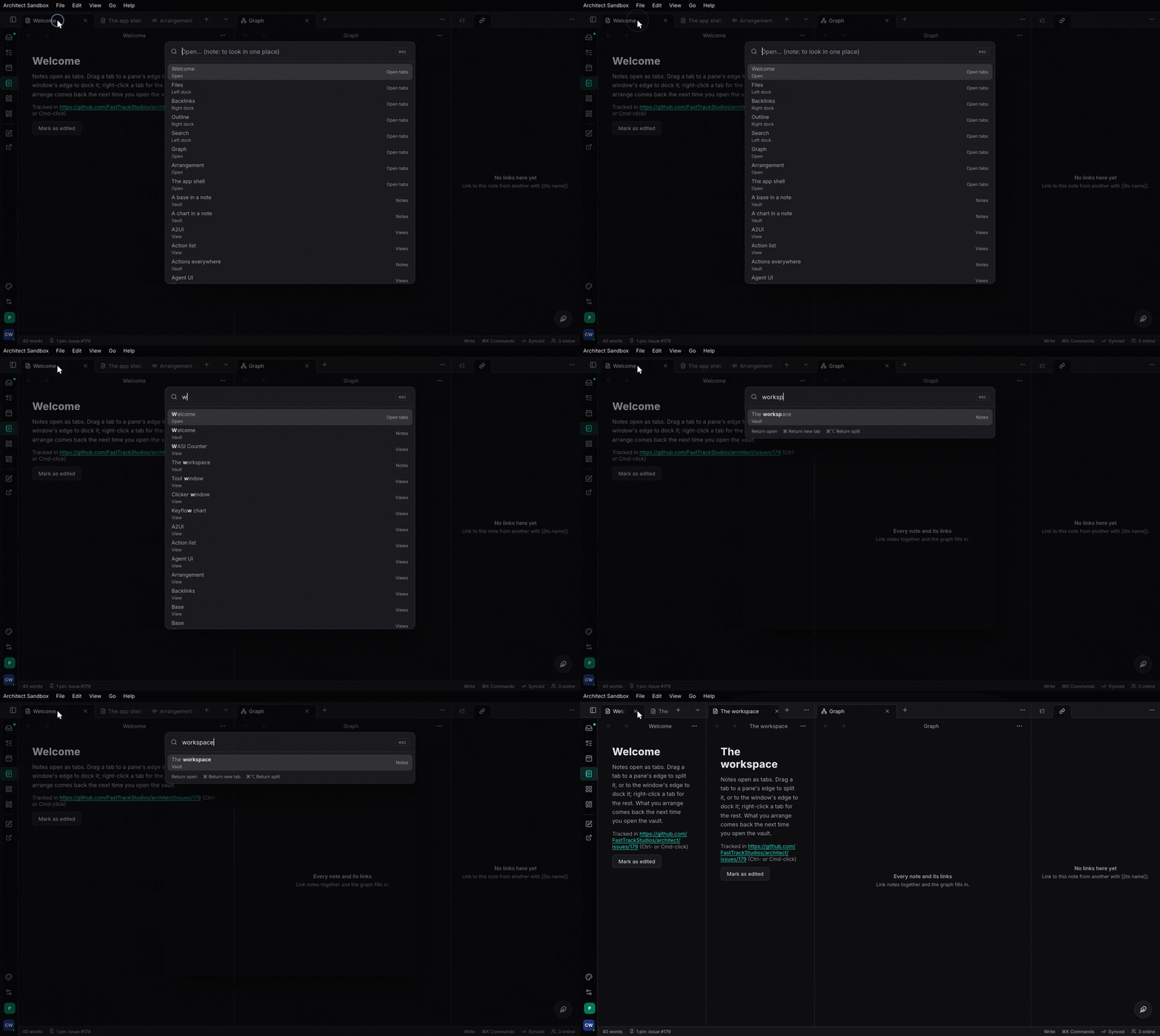
⌘O, quick open (its
QuickOpenView): every opener at once. A feature registers one withuse_opener; the sandbox’s Vault registers its notes and opens the picked one where the person asked (here, a new tab, a split):architect_commands::use_opener(move || { architect_commands::Opener::new( "note", "Notes", |_| NOTES.iter().map(|(id, title)| OpenItem::new("note", *id, *title).detail("Vault")).collect(), move |item, open_in| { let target = match open_in { OpenIn::Here => Target::Here, OpenIn::Tab => Target::Tab, OpenIn::Split => Target::Split(Side::Right), }; let _ = workspace.write().open(note(&item.id, &item.title), target); }, ) });use_palette_opener(Scope::Targets, …)fills the palette’s@the same way; the settings page registers#itself.
-
The action list window (
ActionListView): REAPER’s. Every action, searchable by name, id, group and binding; for each its bindings by context, with the binding editor (BindingEditor: press the chord to record it, conflicts shown, reset to the app’s default) and custom actions with conditions (KeymapTools). It is an ordinary component, so the sandbox makes it a workspace view:View::new("actions", "Action list", |_| rsx! { architect_commands::ActionListView {} })
3. Keys through architect-input#
architect-input (features/input) is the keymap engine: chords, a key
trie, modes, contexts, sequences, which-key, mouse and wheel tables, MIDI
and OSC. A binding maps keys to an action id; it holds no handler.
The keymap#
A keymap is JSON. Bindings can belong to a context (where they apply), and a context’s bindings beat the mode’s own, innermost first:
{
  "keymap": { "normal": { "Ctrl+d": "EDIT_DUPLICATE", "g g": "CURSOR_TOP" } },
  "contexts": {
    "session.arrange": {
      "keys": { "Ctrl+d": "ARRANGE_DUPLICATE" },
      "mouse": { "Z+Left.Drag": "VIEW_ZOOM_BOX" },
      "scroll": { "Z+Scroll": "VIEW_ZOOM" }
    }
  },
  "midi": { "CC64 ch1": "TRANSPORT_PLAY", "Note60": "MARKER_ADD" },
  "osc": { "/transport/play": "TRANSPORT_PLAY" }
}
- Sequences (
g g) wait for the next key; while one is pending,WhichKeyPanelshows what can follow, with each entry’s label.
- Held-letter tools. A key a pointer or wheel pattern names as held
(
Z+Left.Drag) is a modifier while it is down: its press shows the tool’s gestures and runs nothing, and a release with nothing in between is a tap that runs what the key is bound to.
- MIDI and OSC bindings are matched here; the sources are the app’s: it
hands each message in as
InputEvent::Midi/InputEvent::Oscthroughcommands.handle_input(event).
The person’s layer#
Give the commands layer the app’s keymap and the person’s changes over it
(features/commands/src/keys_ui.rs use_keymap):
// `app_keymap`, `load_layer` and `keep_layer` are yours.
architect_commands::use_keymap(
    app_keymap,                                   // fn() -> KeymapConfig, the shipped bindings
    load_layer,                                   // fn() -> PersonKeymap, the person's changes
    Some(Callback::new(move |layer: PersonKeymap| keep_layer(layer))),
);
The on_change callback is where you keep the person’s layer, in their
synced settings so their keys follow them; when it changes on another
device, hand it back with Commands::set_person_keymap. The binding editor
writes to this layer, never to the app’s.
Contexts#
Say which contexts are live as focus moves: commands.set_context("session.arrange.item")
makes session, session.arrange and session.arrange.item live
(set_contexts for names that do not nest by dots).
Keep the keymap and the list in step#
A key bound to an id the list does not have does nothing. Test every
binding names an action, the way docs/content/architecture/input.md
(“Keep the keymap and the list in step”) does.
4. Menus#
The menu bar is a view of the commands (features/commands/src/menu.rs
MenuBar): you say which commands go in which menu; the labels, shortcuts,
enabled state and ticks come from the commands. From the sandbox:
let menus = architect_commands::MenuBar::standard("Architect Lab")
    .menu("File", |m| {
        m.commands(["LAB_CAPTURE", "COMMAND_PALETTE_OPEN_ANYTHING"])
            .separator()
            .commands(["WORKSPACE_CLOSE_TAB", "WORKSPACE_REOPEN_TAB"])
    })
    .menu("View", |m| m.command("LAB_TOGGLE_DETAILS").separator().group("Panes"))
    .menu("Go", |m| {
        // A live section: read again whenever the bar is resolved.
        m.section("Tabs", move || {
            let on = (lab.route)().tab();
            TABS.iter()
                .map(|(id, label, to)| architect_commands::Live::new(*label, *id).checked(*to == on))
                .collect()
        })
    })
    .menu("Help", |m| m.command("COMMAND_PALETTE_OPEN"));
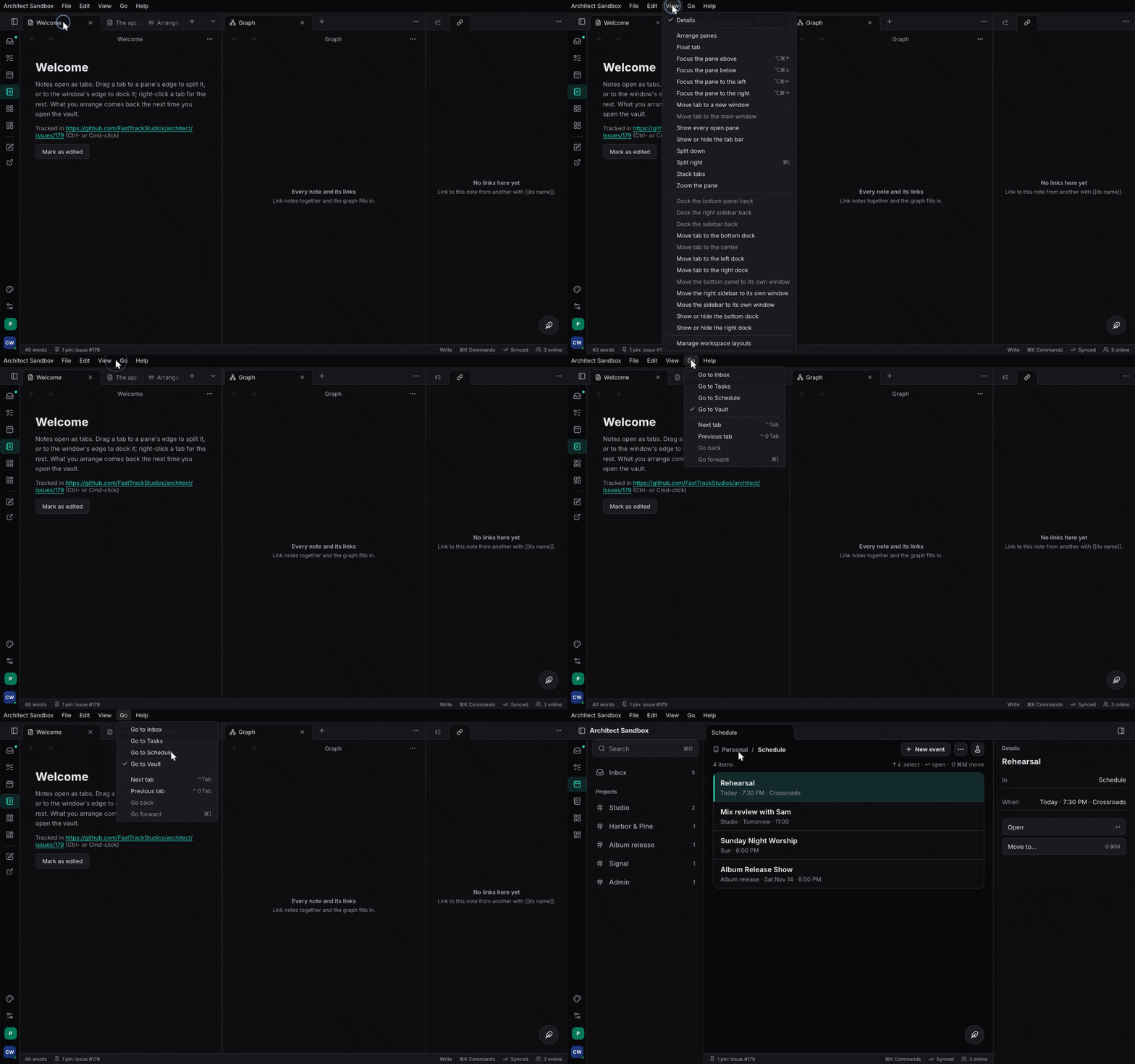
MenuBar::standardlays out the app menu, File, Edit, View, Window and Help with the platform’s own items (Undo, Copy, Minimize, Quit…), wired to the focused view;menu(name, …)fills one (a new name goes before Window).group("Panes")is every command in that group, by label.section(name, rows)is live:Liverows (a label, the command, its arguments, ticked or not), computed each time the bar is resolved. The workspace’sScreensets::menu_rowsis one, for a View ▸ Screensets menu.- A bar resolves again when the lists’ events move on (every run, every
registration, every
list.changed(…)) and when a signal a section reads changes. If you change what acheckedreads outside an action, calllist.changed(topic, detail).
Draw it with both components; the in-window one stands aside where the
platform shows the bar (apps/ui/src/lib.rs NativeMenus):
#[cfg(any(target_os = "macos", target_os = "linux", target_os = "ios"))]
rsx! {
    architect_commands::NativeMenus { bar: menus.clone() }   // AppKit, dbusmenu, UIMenuBuilder
    architect_commands::InWindowMenus { bar: menus }
}
| Platform | Bar |
|---|---|
| macOS | the native menu bar (features/commands/src/native_menu.rs, through muda) |
| Linux | exported as dbusmenu to a global menu (features/commands/src/linux_menu.rs); the in-window bar when no registrar takes it |
| iPad with a keyboard | the iPadOS menu bar (features/commands/src/ios_menu.rs) |
| Windows, other Linux | InWindowMenus, in the shell’s theme |
| Phone | none: the palette and each page’s ⋯ |
The Linux and iPad bars are checked to build, not yet run on a device.
5. MCP#
A model reaches the same list over MCP (features/mcp):
let server = architect_mcp::Server::new("session", env!("CARGO_PKG_VERSION"), list.clone())
    .with_tools(architect_mcp::Tools::Named);           // one tool per action; Generic by default
if let Some(serving) = server.serve_loopback_or(47_811, "FTS_MCP_PORT", "FTS_MCP_TOKEN").await? {
    serving.publish("session")?;                         // <config>/fts/session-mcp.json, 0600
}
Generic tools are actions, describe, run, batch and watch; named
tools are one per action with its params schema. A model runs as a
principal, so give the list the same permission engine as your router’s
gate (list.set_authorizer): the app’s own doors (keys, menus) skip the
authorizer by design, a model’s do not. Bind loopback and set a token for
any app with destructive actions.
The same list is on the command line, with the same answers: CLI and MCP.
Where Task and Studio are#
The palette, quick open, the action list window, bindings and menus are
architect-side. Studio’s library ⌘K/⌘O and Task’s quick switcher become
openers when they move; Studio’s AppKit menu and Session’s dbusmenu tree
become MenuBar declarations. REAPER’s reaper-kb.ini import, keymap
import/export UI and which-key’s pause are still to come.
Where to read more#
- The Action List and MCP: registering, callers, async actions, MCP tools and transports.
- Actions everywhere: the palette, ⌘O, the action list window, custom actions.
- Keymaps: the keymap format, contexts, held-letter tools, user keymaps, which-key.
- App menus: the model, live sections, each platform’s bar.
skills/architect/references/commands-mcp.md.
Linked from
- Build an app with architectA chapter-by-chapter walk through building a real app on architect: the contract, the backend, the server, the clients, the tests and the release.
- The app shell and the workspaceMount architect-shell at the root, give it tabs, sides and a status line, then hand architect-workspace your views and get tab groups, splits, docks, floats, pop-out windows and screensets.
- The UI primitivesWhat architect ships to draw an app with: architect-ui's components and theme tokens, the shell's page parts, every kind of tab and pane in the workspace, the commands overlays, the settings page, and architect-story to browse them.
- CLI and MCPEvery action on the command line, the same as over MCP: the app's control socket, the embeddable actions CLI, headless mode, the same caller and permissions, exit codes, and the parity test that keeps the two faces identical.
- Scripts, extensions and canvasesLet people and models add to the app without rebuilding it: Luau scripts over the Action List as one undo step, extensions with manifests, registries and hot reload, process extensions with remote views, and ImGui-shaped canvases over a view.